

Scheduling AWS EC2 Instance Start/Stop Using CloudWatch Events
In today's cloud-centric era, cost optimization plays a critical role in managing resources efficiently.


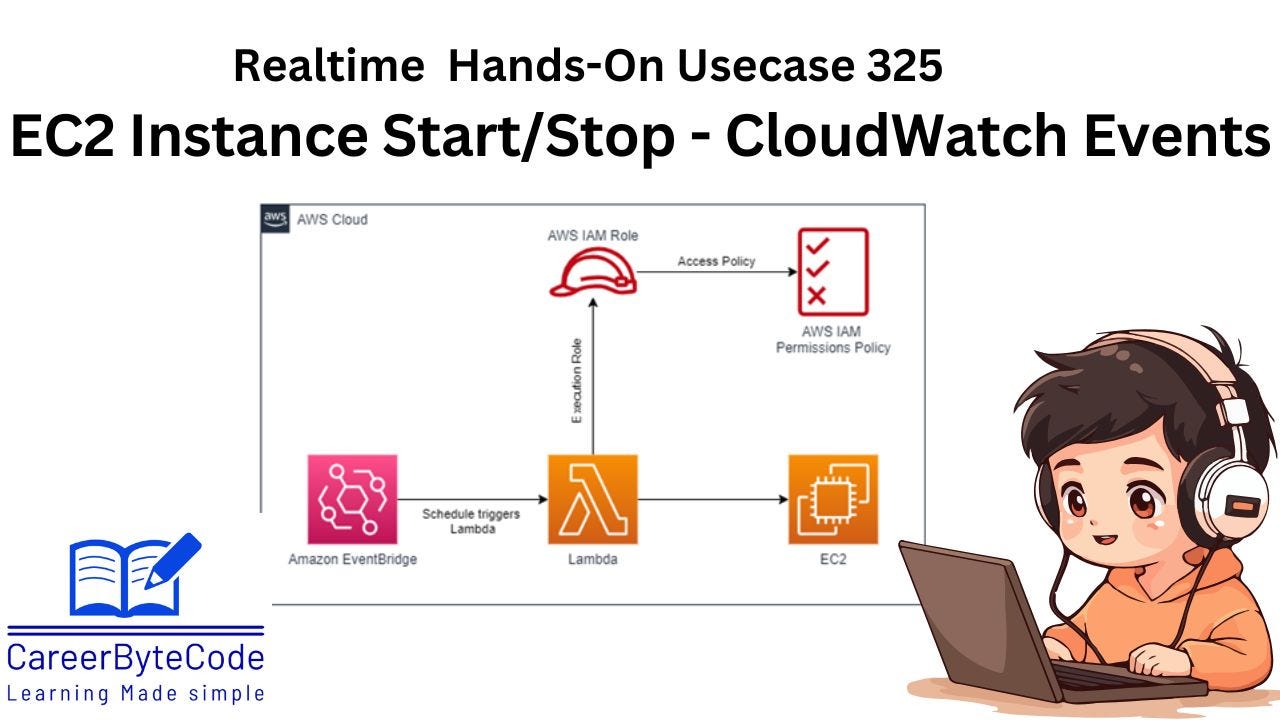
1. About This Use Case
In the modern cloud computing landscape, cost optimization is paramount for businesses that rely on cloud infrastructure such as Amazon Web Services (AWS). A significant portion of AWS costs often comes from EC2 (Elastic Compute Cloud) instances that remain running during non-business hours, leading to wasted computational resources and avoidable expenses. This inefficiency is particularly prevalent in development, staging, and testing environments, which typically do not require 24/7 availability.
The core challenge arises from the manual nature of managing EC2 instance lifecycle operations—such as starting and stopping instances—which is not only error-prone and time-consuming but also inconsistent with the principles of DevOps and Infrastructure as Code (IaC). Without automation, organizations risk overspending, misconfiguring resources, and lacking governance over idle infrastructure.
Additionally, as organizations scale their cloud environments, manually handling multiple instances across various AWS regions becomes impractical. There is also a need to ensure that only intended instances are affected by start/stop operations, which introduces a requirement for dynamic filtering or tagging strategies. Moreover, ensuring the security and resilience of the automation process is crucial, as an incorrect stop operation could impact critical services.
Thus, the problem can be summarized as follows:
2. Problem Statement
Organizations using AWS EC2 instances are incurring unnecessary operational costs due to idle instances running outside of business hours. Manual management of these instances is inefficient, error-prone, and unsustainable at scale. There is a pressing need for a secure, automated, and scalable solution to manage the start and stop lifecycle of EC2 instances based on predefined schedules, without impacting critical workloads or requiring constant human oversight.
This solution should:
Automatically stop EC2 instances during non-business hours and start them during business hours using scheduled triggers.
Allow granular control over which EC2 instances are managed, ideally using instance IDs or tags.
Support scalability across multiple instances and AWS regions.
Minimize potential risks, such as unintentional downtime or delays due to instance boot times.
Integrate easily with existing AWS services, such as CloudWatch Events, AWS Lambda, IAM, and optionally Systems Manager, to enable secure and reliable operations.
Without such a solution, businesses will continue to suffer from excessive cloud bills, operational inefficiencies, and poor governance of cloud resources.
3. Introduction:
In today's cloud-centric era, cost optimization plays a critical role in managing resources efficiently. For businesses running workloads on AWS EC2 instances, non-business hours often lead to unnecessary costs due to idle instances. Automating the start and stop of EC2 instances based on schedules can significantly reduce these expenses without compromising operational needs. This article delves into a practical use case of scheduling EC2 instance start/stop using AWS CloudWatch Events, guided by Lambda functions. By implementing this solution, you can take a step toward an optimized and cost-effective cloud strategy.
4. Why We Need This Use Case
In today's cloud-centric era, cost optimization plays a critical role in managing resources efficiently. Businesses running workloads on AWS EC2 instances often incur unnecessary costs due to idle instances during non-business hours. By automating the start and stop of EC2 instances based on schedules, organizations can significantly reduce expenses without compromising operational needs.
5. When We Need This Use Case
When businesses want to optimize AWS costs by stopping instances outside working hours.
When workloads run only during specific time windows and instances can be turned off when not in use.
When organizations want to enforce policies for automatic instance shutdown to improve security and cost efficiency.
When developers or teams want to ensure non-production environments are only running during working hours.
When businesses require automated cloud resource management without manual intervention.
